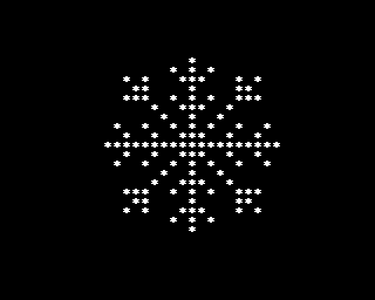
SNOW

Author: regregex
Category: Christmas Challenge
System: BBC Micro A/B/Master, Acorn Electron
Language: 6502 assembler (MASM)
Len source code: 374 bytes
Len exe file:     80 bytes
Len code only:    80 bytes
Instructions:
  Install and open BeebEm ( http://www.mkw.me.uk/beebem/ ).
  Click File -> Disc Options -> New Disc 0, enter bbcsnow.ssd
  Click Edit -> Import Files to Disc -> Disc 0, select xbbcsnow.inf
  At the BASIC prompt, type */X.BBCSNOW and press RETURN.

  To reproduce the screenshots:
  Click Hardware -> BBC Model -> BBC Master 128
  Enter the following:
  *INSERT 9
  *CONFIGURE FILE 9
  *CONFIGURE MODE 4
  Press Ctrl+F12 (CTRL+BREAK), releasing Ctrl last.
  Then follow the instructions above.
  To show the editor screen, import bbcsnow.inf as above, then enter:
  *EDIT BBCSNOW
  Shift+F5, 4, RETURN hides the function key display.
  Shift+F10 (SHIFT+F0) hides newline markers.

Description: The program displays a specific snowflake pattern on the
screen.
It selects display MODE 4, which automatically clears the screen.
For each character cell in a rectangle left of the centre line it prints
an asterisk, if marked on one of two copies of a bitmap, or if lying on
an axis; otherwise a space is printed.  The characters chosen are pushed
on the stack and popped in reverse order to print the right half of the
pattern.  The program waits for a keypress before exiting.

Comments:
Suitable for an SBC running BASIC if selection of MODE 4 is removed.
Delete values ,4,22 from the source or patch the binary with bytes
&FF, &FF.